MSN Weather - Forecast & Maps
- 4.0
- Rating
- 1.00M
- Installs
- Free
- Price

 Analysis by App-foxy
I usually open a weather app for a practical reason: I need to decide what to wear, when to leave, or whether an outdoor plan is worth the effort. MSN Weather - Forecast & Maps approaches that moment as a planning tool rather than just a page showing a temperature. It brings current conditions, forecasts, and map-based weather information together, which makes it useful when I want a quick answer first and a little more context before committing to a plan.
After spending time with it, I see a clear strength in the way it supports a simple workflow: check the situation, look ahead, inspect the wider area, and then make a decision. That sounds straightforward, but many weather apps become cluttered once they add radar, alerts, news, and extra panels. Microsoft Corporation keeps this app recognizable as a weather utility, although the experience is not perfect for everyone. It is free, rated for Everyone, and available for devices running Android 5.0 or later, so it is easy to try without making a purchase decision first.
From a quick morning check to a practical plan
I use MSN Weather as a shared household reference when everyone’s plans depend on the same changing conditions: a morning commute, an errand, or time outside. This section looks at how a quick check can become a practical decision, and why the app’s mix of forecasts and maps is most useful when I know what question I’m trying to answer.
You May Also Like

 Blood Strike: 2.5 Anniversary
Blood Strike’s Loadouts Turn Every Drop Into a Tactical Gamble
A close look at Blood Strike’s custom loadouts: how fast access to signature weapons reshapes its battle royale rhythm, rewards preparation, and narrows the gap between fights.

 Pandora - Music & Podcasts
Pandora’s Music Is Easy to Start, but Harder to Recover
Pandora’s strength is its low-effort path from a seed to a station. Its weak spot is how much confidence it asks you to place in connection, setup, and quiet recovery.

 8 Ball Pool
 Is Built on Rivalries, Rematches, and Routine
A close look at the rivalries, rematches, shared routines, and unanswered safety questions that turn a quick pool match into a persistent mobile community.

 Samsung Music
’s Quiet Strength Is Playing What You Already Own
Its reach comes less from spectacle than from dependable access to a personal library. That simplicity is both the app’s strongest retention engine and its ceiling.

 AccuWeather: Weather Radar
AccuWeather Review: A Quick, Clear Forecast for Everyday Decisions
For everyday plans, the best forecast is the one you can understand quickly. AccuWeather makes rain timing, radar, and local conditions easy to act on, with a few trade-offs.

 Hill Climb Racing
Why Hill Climb Racing Still Turns Crashes Into One More Run
A tiny car, a bumpy hill and one more upgrade: Hill Climb Racing keeps resurfacing because its simple chaos makes every near-miss feel personal.
More From Our News Desk



The starting point: what I need to know before leaving
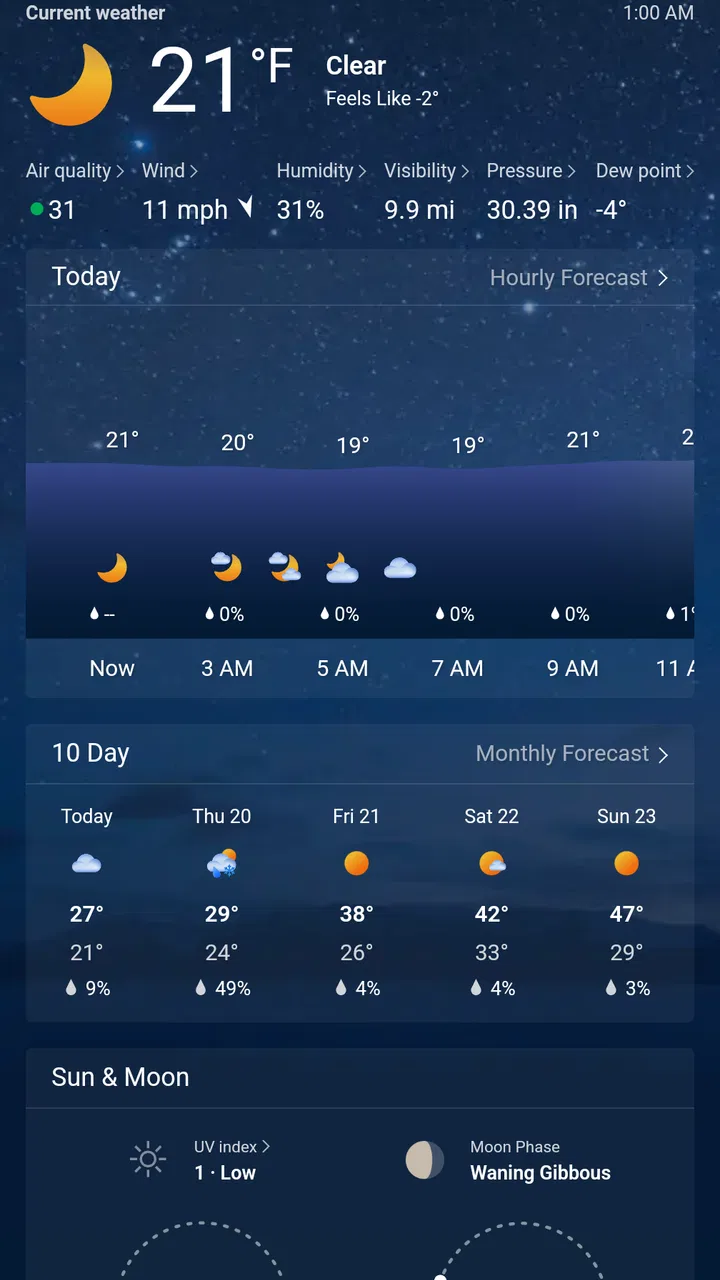
My most common use begins in the morning. I want to know whether a light jacket is enough, whether rain could affect the school run, and whether a later appointment might be uncomfortable. MSN Weather gives me a useful first stop because the current conditions and forecast sit within the same weather-focused experience. I do not have to begin by interpreting a complicated chart; I can start with the basic state of the day and then decide whether more detail is necessary.
That order matters. A weather app can be technically rich but still inconvenient if its most important information is buried. Here, I find the app most effective when I treat it as a decision ladder: first establish what is happening now, then check the upcoming period, and only afterward use maps or broader views. This keeps a routine check quick while leaving room for a closer look when the weather is changing.
The app belongs to the weather category, and its public presence suggests that many people use it as a regular utility rather than a novelty. It has a 4.2 average from around 43 thousand ratings and more than a million installs. Those figures do not replace personal testing, but they do match my impression that this is designed for ordinary daily use, not only for weather enthusiasts who want specialized meteorological tools.
Step one: establish the immediate conditions
I begin with the current view because it answers the question most people ask first: what is it like outside right now? This is especially helpful when the sky looks misleading. A bright window can hide a cold morning, while a gray afternoon does not always mean that rain is imminent. The current information gives me a reference point before I compare it with the forecast.
My advice is not to stop at the first number you see. The useful habit is to connect the present conditions with the plan you are making. If I am walking for only a few minutes, a brief glance may be enough. If I am cycling, waiting outdoors, or carrying equipment, I need to continue into the forecast and maps. The app works better when I use its layers according to the decision rather than scrolling through everything automatically.
This is one of the less obvious strengths of the experience: the app can reduce unnecessary checking when I use it deliberately. I do not need a full weather investigation for every trip to the store. At the same time, the presence of forecasts and maps means the same app can support a more careful decision when a quick glance is not enough.
Step two: move from now to later
The next handoff is from current conditions to the forecast. This is where I decide whether the immediate situation is temporary or likely to continue. For a commute, I care about the period when I will actually be outside, not simply the weather at the moment I open the app. For an outdoor lunch, I want to compare the beginning and end of the plan rather than rely on a single snapshot.
I find it useful to read the forecast as a sequence of possible decisions. If the early part of the day looks manageable but the later period appears less inviting, I can move an errand forward. If the conditions improve later, I can postpone a walk instead of canceling it. That workflow is more valuable than memorizing a single forecast detail, because it turns weather information into a schedule adjustment.
There is also a trade-off here. A forecast is guidance, not a guarantee, and I would not use this app as the sole basis for a safety-critical outdoor decision. For normal planning, it is convenient; for severe or highly localized conditions, I would cross-check with an official local source. That is not a criticism unique to this app, but it is an important boundary for anyone expecting absolute certainty from a phone forecast.
Step three: use maps when the local view is not enough
The map component becomes useful when I need to understand what is happening around my immediate location. A single local forecast can feel abstract when conditions are moving across a region. Looking at a map helps me connect the forecast with the wider pattern, particularly when I am deciding whether to travel, wait, or change direction.
I use maps as a confirmation step rather than as my first screen. Starting there can create unnecessary friction because a map contains more information to interpret. Once I already know the basic conditions, the map answers a more focused question: is the weather approaching, passing nearby, or spread across the area I need to cross? That makes the feature more useful for a route decision than for a casual morning glance.
A practical example is a weekend market visit. I might first check the conditions at home, then look ahead to the expected period of the visit, and finally inspect the surrounding area before leaving. If the map suggests that the uncomfortable weather is concentrated along the route rather than at the destination, I can change the departure time or choose a different way to get there. The app does not make that decision for me; it gives me a more coherent handoff from local information to regional context.
Passing the information to the rest of my day
Weather information rarely stays inside the app. I carry the result into a calendar, a commute, a conversation with family, or a decision about clothing and equipment. MSN Weather is most successful at this handoff when the decision is simple and personal: leave now, wait, bring an extra layer, or move an outdoor activity.
For a family routine, I might check it before everyone leaves, then translate the result into an easy instruction: take a coat, allow more time, or keep the outdoor plan flexible. For work, I can use the forecast to decide whether a meeting that involves travel needs a buffer. The value is not in staring at the screen; it is in reducing uncertainty before the next action.
This is also where I notice a limitation. The app can inform a plan, but it does not replace the tools where the plan is managed. I still need my calendar, navigation app, or messaging app to complete the next step. That separation is normal, but users looking for an all-in-one planning assistant may find the handoff manual. I prefer that boundary to an app that tries to do too many unrelated things, though other readers may want deeper integration.
What the result feels like in everyday use
The outcome I get is usually modest but useful: I make a better small decision. I avoid dressing too lightly, leave before conditions worsen, or stop treating an outdoor plan as fixed when the forecast suggests flexibility. That may sound less dramatic than a specialized weather analysis, but it is exactly why a general weather app earns a place on my phone.
The strongest result comes from combining the three levels of information. Current conditions tell me what is happening, the forecast helps me place it in time, and maps give me a wider view. I would not use every layer for every question, but together they create a sensible path from observation to action.
The app also feels approachable for people who do not want to learn weather terminology. I can use it as a quick daily check without becoming an expert, then explore more when a trip or event deserves attention. That balance makes it a reasonable recommendation for families, commuters, students, and casual travelers who want more than a single temperature but less than a professional forecasting workstation.
Where the workflow breaks down
The first point of friction is information density. Once I move beyond the basic view, forecasts and maps can require more attention than a simple glance. That is not necessarily a flaw, because detail is useful, but it means the app is not always the fastest choice for someone who wants one minimal answer and nothing else.
The second issue is interpretation. A map can show a broad weather pattern without automatically explaining what that pattern means for my exact street, route, or event. I still have to judge timing and local relevance. People who prefer an app that turns every change into a very direct instruction may find this experience less immediately reassuring.
I also would not choose it as my only weather reference for specialized needs. Someone planning mountain activity, marine travel, aviation, or another situation where local expertise and official warnings matter should use more dedicated sources as well. MSN Weather is better at everyday planning than at replacing specialist information.
Another consideration is platform age. The minimum requirement of Android 5.0 makes the app accessible to older Android devices, but compatibility alone does not tell me how every individual phone will feel in practice. On an older handset, I would keep expectations realistic about responsiveness, especially when moving between ordinary forecast information and map views.
Who should use it, and who should look elsewhere?
I would recommend it to someone who wants a free weather app from a familiar developer and values a path from quick conditions to forecasts and maps. It suits people who check the weather before commuting, walking, shopping, traveling locally, or organizing a casual outdoor activity. The Everyone age rating also makes it an uncomplicated option for a shared household device.
I would be more cautious about recommending it to a person who wants an extremely stripped-down interface, highly specialized forecasting, or a complete planning system connected to every other app they use. In those cases, a simpler weather widget or a specialist service may be a better fit. The right choice depends on whether the reader values breadth and context more than absolute minimalism.
Compared with a basic phone widget, MSN Weather gives me a fuller route from current conditions to forecasts and maps. Compared with a specialist weather service, it feels more approachable but less tailored to expert analysis. Compared with checking a search engine, it offers a more consistent place to return to, especially when I want to move from a quick answer into a wider weather view without starting over.
Practical habits that make it more useful
I get better results when I check the app at the decision point, not only hours in advance. A forecast viewed in the morning can help me prepare, but a second look before leaving lets me compare the plan with the current situation. This two-stage habit is particularly useful for changing weather and prevents me from treating an early estimate as a promise.
I also avoid opening the map without a question in mind. Instead, I ask whether conditions are moving toward my route, whether the destination differs from home, or whether waiting could make a practical difference. That small change turns the map from a visual extra into a decision tool.
Finally, I use the forecast to build flexibility rather than to create false precision. If an outdoor plan matters, I keep an alternative time or indoor option ready. The app helps me choose between those options, but it cannot remove uncertainty. Its real strength is helping me make a sensible next move with the information available.
My recommendation after using it
MSN Weather is a solid everyday weather app for people who want a little more context than a temperature widget provides. Its combination of current conditions, forecasts, and maps supports a complete routine: check the present, look ahead, inspect the wider area, and carry the result into the rest of the day. I appreciate that it can stay simple for a quick check while still offering a deeper route when a plan depends on timing or location.
It is not the best answer for every weather question. I would not rely on it alone for specialist outdoor decisions, and users who dislike layered information may prefer something more minimal. Still, its free price, broad device accessibility, and established audience make it easy to try. The current release, version 30.2.241212005, represents the app I reviewed, and the overall experience remains practical rather than flashy.
My final view is straightforward: if you want a dependable starting point for daily weather decisions, I think MSN Weather - Forecast & Maps is worth installing. I would use it for commuting, errands, family routines, and flexible outdoor plans, while keeping an official or specialist source nearby whenever the consequences of getting the forecast wrong are serious. For ordinary life, it turns a vague question about the sky into a clearer choice about what to do next.
FAQs for MSN Weather - Forecast & Maps
01What features does MSN Weather offer to help me plan my day?
MSN Weather provides comprehensive weather forecasts, including hourly, daily, and 10-day predictions. It also features interactive maps with radar and satellite views, allowing you to track weather patterns in real-time. Additionally, you get severe weather alerts to keep you informed about any upcoming weather hazards.
02Is MSN Weather available for both Android and iOS devices?
Yes, MSN Weather is available for download on both Android and iOS platforms. You can find it on the Google Play Store for Android devices and the Apple App Store for iOS devices, ensuring that users from both ecosystems can access its features easily.
03Does MSN Weather support multiple locations for weather tracking?
Absolutely, MSN Weather allows users to add multiple locations, enabling you to monitor weather conditions not only in your current location but also in other cities or countries. This feature is particularly useful for travelers or those with family and friends in different areas.
04Does MSN Weather provide notifications for severe weather alerts?
Yes, MSN Weather offers real-time notifications for severe weather alerts. This feature ensures that you are promptly informed about any significant weather changes or potential hazards, allowing you to take necessary precautions to stay safe and plan accordingly.
05Can I customize the appearance and layout of the MSN Weather app?
MSN Weather offers several customization options to enhance user experience. You can personalize the app by adjusting settings like temperature units (Celsius or Fahrenheit), the appearance of the live tiles, and choosing which weather details are prominently displayed, allowing you to tailor the app to your preferences.
Pros
- Accurate weather forecasts with hourly updates.
- User-friendly interface with easy navigation.
- Customizable alerts for extreme weather conditions.
- Live radar maps with detailed visuals.
- Supports multiple locations for global tracking.
Cons
- Occasional ads can be intrusive.
- Limited offline functionality.
- Some features require a data connection.
- Customization options could be expanded.
- May drain battery with constant updates.

MSN Weather - Forecast & Maps
Gallery